zerocal —— 基于 Rust、运行在 shuttle.rs 上的无服务器日历应用
原文由 Matthias Endler 于 发布,订阅该博客
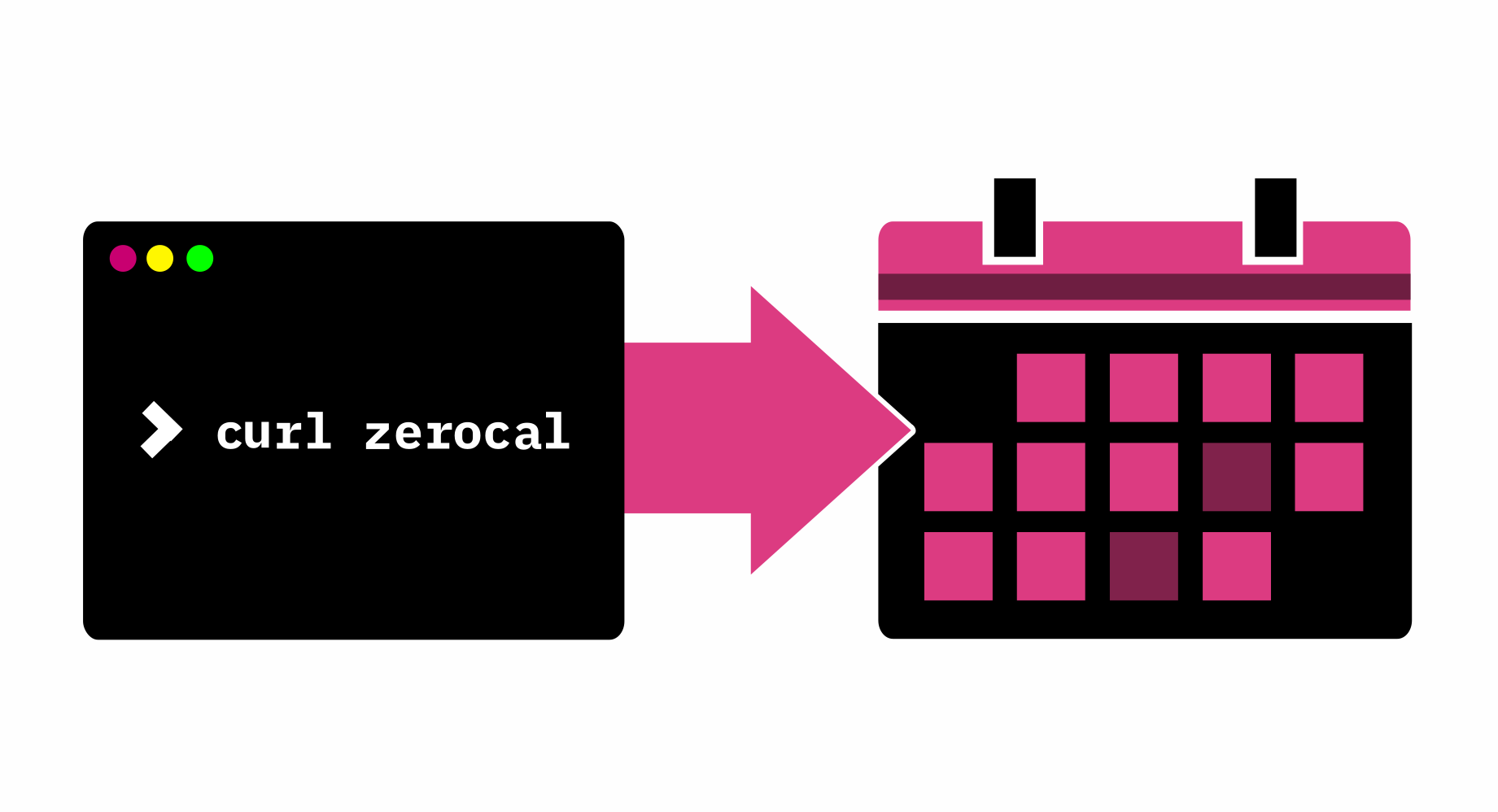
我和朋友们时不时会约着一起吃顿饭。我很珍惜这样的晚上,但最让人头疼的就是定时间这件事!
我们在群里发个消息。
等大家回复。
定下一个日期。
有人发出日历邀请。
事情才终于定下来。
除了吃饭本身,这个过程一点意思都没有。
你这么通情达理,肯定会想:“为什么不用个约时间的应用呢?”
我试过很多,没有一个好用的。它们全都……太重了!
我就想发个邀请,想来的就来。
- 我不想为了你的什么日历/约时间/乱七八糟的应用去注册账号。
- 我不想去添加我的朋友。
- 我不想去添加朋友的朋友。
- 我不想去添加朋友的朋友的朋友。
- 你懂我的意思:我就想发个邀请,不用等你回复。
死宅内向工程师的解决方案
💡 我们显然需要的,是再做一个日历应用,让我们可以创建活动、然后丢个链接去邀请大家!你肯定没想到会是这个吧?
哦对了,我也不想用 Google Calendar 来创建活动,因为我不信任他们。
像任何一个正常人一样,我想直接在终端里创建日历条目。
上次我就是这么跟朋友们推销这个想法的。他们的回答是:“不知道,听起来像是为了解决问题而硬找问题。”不过俗话说得好:别找海星问路。
少说多做
那天晚上我回到家,就搭了个网站,能通过 GET 参数生成日历条目。
这样你就能在命令行里轻松创建日历事件了:
> curl https://zerocal.shuttleapp.rs?start=2022-11-04+20:00&duration=3h&title=Birthday&description=paaarty
BEGIN:VCALENDAR
VERSION:2.0
PRODID:ICALENDAR-RS
CALSCALE:GREGORIAN
BEGIN:VEVENT
DTSTAMP:20221002T123149Z
CLASS:CONFIDENTIAL
DESCRIPTION:paaarty
DTEND:20221002T133149Z
DTSTART:20221002T123149Z
SUMMARY:Birthday
UID:c99dd4bb-5c35-4d61-9c46-7a471de0e7f4
END:VEVENT
END:VCALENDAR
然后你可以把它保存成文件,再用日历应用打开。
> curl https://zerocal.shuttleapp.rs?start=2022-11-04+20:00&duration=3h&title=Birthday&description=paaarty > birthday.ics
> open birthday.ics
从某种意义上说,这就是个“无服务器日历应用”,哈哈。服务器上不保存任何状态,只是即时生成一个日历事件并返回。
我是如何构建的
你大概已经注意到 URL 里有“shuttleapp.rs”。那是因为我用了 shuttle.rs 来托管这个网站。
Shuttle 是一个面向 Rust 项目的托管服务,我早就想试试了。
要用超棒的 axum Web 框架来初始化项目,我执行了
cargo install cargo-shuttle
cargo shuttle init --axum --name zerocal zerocal
然后就得到了上手所需的一切:
use axum::{routing::get, Router};
use sync_wrapper::SyncWrapper;

async fn hello_world() -> &'static str {
  "Hello, world!"
}

#[shuttle_service::main]
async fn axum() -> shuttle_service::ShuttleAxum {
  let router = Router::new().route("/hello", get(hello_world));
  let sync_wrapper = SyncWrapper::new(router);

  Ok(sync_wrapper)
}
赶紧把改动提交一下:
git add .gitignore Cargo.toml src/
git commit -m "Hello World"
要部署代码,我需要先注册一个 Shuttle 账号。可以在 https://www.shuttle.rs/login 完成。
它会请求授权访问你的 Github 账号。
然后:
cargo shuttle login最后:
cargo shuttle deploy现在来看看 zerocal.shuttleapp.rs:
Hello World!部署第一个版本花了不到 5 分钟。真不错!我们的定制日历应用已经就绪。
编写应用
为了创建日历事件,我用了 icalendar 这个 crate(感谢 hoodie 做了这么好用的库!)。iCalendar 是创建日历事件的标准,大多数日历应用都支持。
cargo add icalendar
cargo add chrono # For date and time parsing
来创建一个示例日历事件:
let event = Event::new()
  .summary("test event")
  .description("here I have something really important to do")
  .starts(Utc::now())
  .ends(Utc::now() + Duration::days(1))
  .done();
很简单吧。
怎么返回一个文件!?
有了日历事件,接下来就要把它返回给用户。但怎么以文件的形式返回呢?
在 axum 的这里有一个动态返回文件的示例。
async fn calendar() -> impl IntoResponse {
  let ical = Calendar::new()
    .push(
      // add an event
      Event::new()
        .summary("It works! 😀")
        .description("Meeting with the Rust community")
        .starts(Utc::now() + Duration::hours(1))
        .ends(Utc::now() + Duration::hours(2))
        .done(),
    )
    .done();

  CalendarResponse(ical)
}
这里有几个值得注意的地方:
- 每个日历文件都是事件的集合,所以我们把事件包在
Calendar对象里,它就代表这个集合。 impl IntoResponse是一个 trait,它允许我们返回任何实现了该 trait 的类型。CalendarResponse是对Calendar的 newtype 包装,它实现了IntoResponse。
这是 CalendarResponse 的实现:
/// Newtype wrapper around Calendar for `IntoResponse` impl
#[derive(Debug)]
pub struct CalendarResponse(pub Calendar);

impl IntoResponse for CalendarResponse {
  fn into_response(self) -> Response {
    let mut res = Response::new(boxed(Full::from(self.0.to_string())));
    res.headers_mut().insert(
      header::CONTENT_TYPE,
      HeaderValue::from_static("text/calendar"),
    );
    res
  }
}
我们只需创建一个新的 Response 对象,并把 Content-Type 头设为 iCalendar 文件对应的 MIME 类型:text/calendar,然后返回响应。
添加日期解析
这部分有点取巧,粗略看看就行。我们需要从查询字符串中解析日期和时长。我用了 dateparser,因为它支持超多种日期格式。
async fn calendar(Query(params): Query<HashMap<String, String>>) -> impl IntoResponse {
  let mut event = Event::new();
  event.class(Class::Confidential);

  if let Some(title) = params.get("title") {
    event.summary(title);
  } else {
    event.summary(DEFAULT_EVENT_TITLE);
  }
  if let Some(description) = params.get("description") {
    event.description(description);
  } else {
    event.description("Powered by zerocal.shuttleapp.rs");
  }

  if let Some(start) = params.get("start") {
    let start = dateparser::parse(start).unwrap();
    event.starts(start);
    if let Some(duration) = params.get("duration") {
      let duration = humantime::parse_duration(duration).unwrap();
      let duration = chrono::Duration::from_std(duration).unwrap();
      event.ends(start + duration);
    }
  }

  if let Some(end) = params.get("end") {
    let end = dateparser::parse(end).unwrap();
    event.ends(end);
    if let Some(duration) = params.get("duration") {
      if params.get("start").is_none() {
        let duration = humantime::parse_duration(duration).unwrap();
        let duration = chrono::Duration::from_std(duration).unwrap();
        event.starts(end - duration);
      }
    }
  }

  let ical = Calendar::new().push(event.done()).done();

  CalendarResponse(ical)
}
要是能支持 now 和 tomorrow 这类更人性化的日期格式就更好了,不过留到以后再说吧。
来测试一下:
> cargo shuttle run # This starts a local dev server
> curl 127.0.0.1:8000?start=2022-11-04+20:00&duration=3h&title=Birthday&description=Party
*🤖 bleep bloop, calendar file created*
不错,能用了!
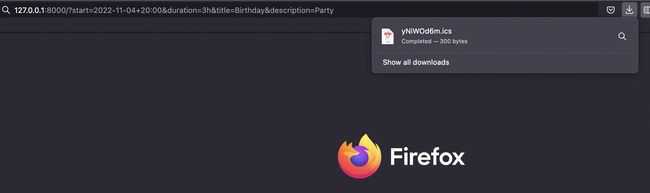
在浏览器中打开它,就会在日历中创建一个新事件:
照顾一下那些不用终端创建日历事件的“怪人”,我们也给网站加个表单吧。
添加表单
<form>
  <table>
    <tr>
      <td>
        <label for="title">Event Title</label>
      </td>
      <td>
        <input type="text" id="title" name="title" value="Birthday" />
      </td>
    </tr>
    <tr>
      <td>
        <label for="desc">Description</label>
      </td>
      <td>
        <input type="text" id="desc" name="desc" value="Party" />
      </td>
    </tr>
    <tr>
      <td><label for="start">Start</label></td>
      <td>
        <input type="datetime-local" id="start" name="start" />
      </td>
    </tr>
    <tr>
      <td><label for="end">End</label></td>
      <td>
        <input type="datetime-local" id="end" name="end" />
      </td>
    </tr>
  </table>
</form>
我稍微改了一下 calendar 函数,如果查询字符串为空就返回表单:
async fn calendar(Query(params): Query<HashMap<String, String>>) -> impl IntoResponse {
  // if query is empty, show form
  if params.is_empty() {
    return Response::builder()
      .status(200)
      .body(boxed(Full::from(include_str!("../static/index.html"))))
      .unwrap();
  }

  // ...
}
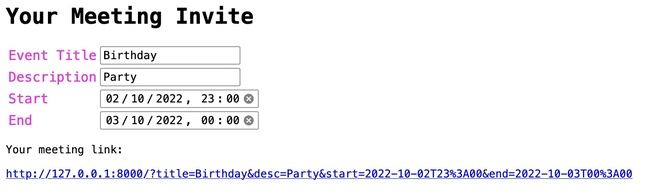
再稍作调整,我们就得到了一个充满 Web 1.0 荣光的精美小表单:
就是这样!我们现在有了一个能创建日历事件的小 Web 应用。嗯,差不多了,就差部署了。
部署
cargo shuttle deploy没错,就这么简单。就是这么容易。感谢 shuttle.rs 的小伙伴们让这一切成为可能。
日历应用现在已上线,地址是 zerocal.shuttleapp.rs。
现在我终于可以给朋友们发个日历事件链接,约下一次的酒吧巡游了。他们肯定会很感激的。是啊是啊
用 100 行 Rust 从零到日历
重新写点纯 HTML 的感觉真好。
做点小应用永远都不会腻。
欢迎去 GitHub 查看源代码,帮我一起把它做得更好!🙏
这里有一些想法:
- ✅ 添加地点支持(例如
location=Berlin或location=https://zoom.us/test)。感谢 sigaloid。 - 添加对更人性化日期格式的支持(例如
now、tomorrow)。 - 添加对重复事件的支持。
- 添加对时区的支持。
- 添加 Google Calendar 短链接(
https://calendar.google.com/calendar/render?action=TEMPLATE&dates=20221003T224500Z%2F20221003T224500Z&details=&location=&text=)。 - 添加从命令行创建日历事件的 Bash 命令示例。
- 缩短 URL(例如
zerocal.shuttleapp.rs/2022-11-04T20:00/3h/Birthday/Party)?
欢迎查看 issue 跟踪,随时提 PR!
评论
登录后参与讨论