zerocal — shuttle.rsで動くRust製サーバーレスカレンダーアプリ
原文は Matthias Endler により に公開されました。 このブログを購読する
時々、仲間たちと夕食を共にする。大切な時間だが、一番うんざりするのは日程調整だ!
グループにメッセージを送る。
返事を待つ。
日付を決める。
誰かがカレンダーの招待を送る。
ようやく実現する。
楽しいのは夕食だけだ。
常識のある人なら、「スケジュール調整アプリを使えばいいじゃないか」と思うだろう。
いろいろ試してみたが、どれもイマイチだ。どれも…やりすぎなのだ!
ただ招待を送って、来たい人が来ればそれでいい。
- 君のカレンダー/スケジュール/その他もろもろのアプリのためにアカウントを作りたくない。
- 友達を登録したくない。
- 友達の友達を登録したくない。
- 友達の友達の友達なんて登録したくない。
- 言いたいことは分かるだろう。ただ招待を送って、君からは返事がなくてもいいんだ。
オタクで内向的なエンジニアの解決策
💡 絶対に必要なのは、イベントを作成してリンク付きで招待を送れる、また別のカレンダーアプリだ! もちろん予想外だっただろう?
あと、イベント作成に Google カレンダーは使いたくない。なぜなら信用 して いないからだ。
至極まっとうな人間として、ターミナルからカレンダーの予定を作れる方法が欲しかった。
前回、仲間たちにそう持ちかけてみた。返事は「よく分からないけど、問題を探している解決策みたいだね」だった。でも言うだろう、ヒトデに道を尋ねるな、と。
百聞は一見にしかず
その夜、家に帰ってGETパラメータからカレンダーの予定を作成するウェブサイトを作った。
これでコマンドラインから手軽にカレンダーイベントを作れる:
> curl https://zerocal.shuttleapp.rs?start=2022-11-04+20:00&duration=3h&title=Birthday&description=paaarty
BEGIN:VCALENDAR
VERSION:2.0
PRODID:ICALENDAR-RS
CALSCALE:GREGORIAN
BEGIN:VEVENT
DTSTAMP:20221002T123149Z
CLASS:CONFIDENTIAL
DESCRIPTION:paaarty
DTEND:20221002T133149Z
DTSTART:20221002T123149Z
SUMMARY:Birthday
UID:c99dd4bb-5c35-4d61-9c46-7a471de0e7f4
END:VEVENT
END:VCALENDAR
それをファイルに保存して、カレンダーアプリで開けばいい。
> curl https://zerocal.shuttleapp.rs?start=2022-11-04+20:00&duration=3h&title=Birthday&description=paaarty > birthday.ics
> open birthday.ics
ある意味「サーバーレスなカレンダーアプリ」だ、はは。サーバー側に状態はなく、ただその場でカレンダーイベントを生成して返すだけだ。
作り方
URLに「shuttleapp.rs」が含まれているのに気づいただろうか。ウェブサイトのホスティングにshuttle.rsを使っているからだ。
Shuttle は Rust プロジェクト向けのホスティングサービスで、ずっと試してみたかったのだ。
素晴らしいaxumウェブフレームワークを使ってプロジェクトを初期化するために、以下を実行した
cargo install cargo-shuttle
cargo shuttle init --axum --name zerocal zerocal
すると、始めるのに必要なものがすべて揃って出迎えてくれた:
use axum::{routing::get, Router};
use sync_wrapper::SyncWrapper;

async fn hello_world() -> &'static str {
  "Hello, world!"
}

#[shuttle_service::main]
async fn axum() -> shuttle_service::ShuttleAxum {
  let router = Router::new().route("/hello", get(hello_world));
  let sync_wrapper = SyncWrapper::new(router);

  Ok(sync_wrapper)
}
さっと変更をコミットしよう:
git add .gitignore Cargo.toml src/
git commit -m "Hello World"
コードをデプロイするには、shuttle のアカウント登録が必要だ。これはhttps://www.shuttle.rs/loginからできる。
GitHub アカウントへのアクセス許可を求められる。
それから:
cargo shuttle loginそして最後に:
cargo shuttle deployさあ、zerocal.shuttleapp.rsにアクセスしてみよう:
Hello World!最初のバージョンのデプロイは5分もかからなかった。いいね!これで自作カレンダーアプリの準備は完了だ。
アプリを書く
カレンダーイベントの作成にはicalendarクレートを使った(素敵なライブラリを作ってくれたhoodieに感謝!)。iCalendarはほとんどのカレンダーアプリでサポートされている、カレンダーイベント作成のための標準規格だ。
cargo add icalendar
cargo add chrono # For date and time parsing
試しにカレンダーイベントを作ってみよう:
let event = Event::new()
  .summary("test event")
  .description("here I have something really important to do")
  .starts(Utc::now())
  .ends(Utc::now() + Duration::days(1))
  .done();
至ってシンプルだ。
ファイルをどうやって返す!?
カレンダーイベントができたので、次はユーザーに返さなければならない。でも、どうやってファイルとして返すのか?
axum でファイルを動的に返す方法の例がこちらにある。
async fn calendar() -> impl IntoResponse {
  let ical = Calendar::new()
    .push(
      // add an event
      Event::new()
        .summary("It works! 😀")
        .description("Meeting with the Rust community")
        .starts(Utc::now() + Duration::hours(1))
        .ends(Utc::now() + Duration::hours(2))
        .done(),
    )
    .done();

  CalendarResponse(ical)
}
ここで注目すべき点がいくつかある:
- カレンダーファイルはイベントのコレクションなので、イベントをコレクションを表す
Calendarオブジェクトでラップしている。 impl IntoResponseは、それを実装した任意の型を返せるようにするトレイトだ。CalendarResponseはCalendarをラップしてIntoResponseを実装したnewtype wrapperだ。
CalendarResponseの実装はこうなる:
/// Newtype wrapper around Calendar for `IntoResponse` impl
#[derive(Debug)]
pub struct CalendarResponse(pub Calendar);

impl IntoResponse for CalendarResponse {
  fn into_response(self) -> Response {
    let mut res = Response::new(boxed(Full::from(self.0.to_string())));
    res.headers_mut().insert(
      header::CONTENT_TYPE,
      HeaderValue::from_static("text/calendar"),
    );
    res
  }
}新しいResponseオブジェクトを作り、iCalendar ファイル用の正しい MIME タイプであるtext/calendarをContent-Typeヘッダーにセットする。そしてレスポンスを返すだけだ。
日付のパースを追加する
この部分は少々場当たり的なので、ざっと眺めるだけでいい。クエリ文字列から日付と期間をパースする必要がある。dateparserを使ったのは、めちゃくちゃ多くの日付フォーマットに対応しているからだ。
async fn calendar(Query(params): Query<HashMap<String, String>>) -> impl IntoResponse {
  let mut event = Event::new();
  event.class(Class::Confidential);

  if let Some(title) = params.get("title") {
    event.summary(title);
  } else {
    event.summary(DEFAULT_EVENT_TITLE);
  }
  if let Some(description) = params.get("description") {
    event.description(description);
  } else {
    event.description("Powered by zerocal.shuttleapp.rs");
  }

  if let Some(start) = params.get("start") {
    let start = dateparser::parse(start).unwrap();
    event.starts(start);
    if let Some(duration) = params.get("duration") {
      let duration = humantime::parse_duration(duration).unwrap();
      let duration = chrono::Duration::from_std(duration).unwrap();
      event.ends(start + duration);
    }
  }

  if let Some(end) = params.get("end") {
    let end = dateparser::parse(end).unwrap();
    event.ends(end);
    if let Some(duration) = params.get("duration") {
      if params.get("start").is_none() {
        let duration = humantime::parse_duration(duration).unwrap();
        let duration = chrono::Duration::from_std(duration).unwrap();
        event.starts(end - duration);
      }
    }
  }

  let ical = Calendar::new().push(event.done()).done();

  CalendarResponse(ical)
}nowやtomorrowのような日付フォーマットにも対応できると良いのだが、それはまた今度にしよう。
試してみよう:
> cargo shuttle run # This starts a local dev server
> curl 127.0.0.1:8000?start=2022-11-04+20:00&duration=3h&title=Birthday&description=Party
*🤖 bleep bloop, calendar file created*
よし、動いた!
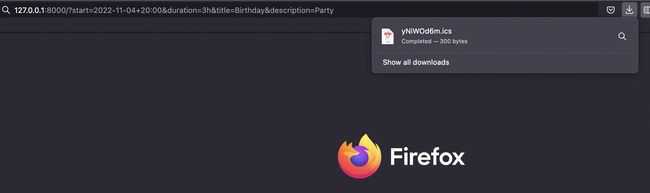
ブラウザで開くと、カレンダーに新しいイベントが作成される:
そして、ターミナルでカレンダーイベントを作らない変わり者のためにも、ウェブサイトにフォームを追加しておこう。
フォームを追加する
<form>
  <table>
    <tr>
      <td>
        <label for="title">Event Title</label>
      </td>
      <td>
        <input type="text" id="title" name="title" value="Birthday" />
      </td>
    </tr>
    <tr>
      <td>
        <label for="desc">Description</label>
      </td>
      <td>
        <input type="text" id="desc" name="desc" value="Party" />
      </td>
    </tr>
    <tr>
      <td><label for="start">Start</label></td>
      <td>
        <input type="datetime-local" id="start" name="start" />
      </td>
    </tr>
    <tr>
      <td><label for="end">End</label></td>
      <td>
        <input type="datetime-local" id="end" name="end" />
      </td>
    </tr>
  </table>
</form>calendar関数を少し修正して、クエリ文字列が空の場合はフォームを返すようにした:
async fn calendar(Query(params): Query<HashMap<String, String>>) -> impl IntoResponse {
  // if query is empty, show form
  if params.is_empty() {
    return Response::builder()
      .status(200)
      .body(boxed(Full::from(include_str!("../static/index.html"))))
      .unwrap();
  }

  // ...
}
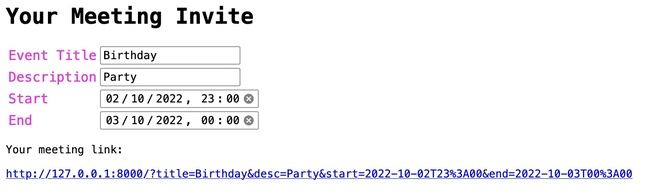
さらに少し手を加えて、web 1.0 全開の素敵なフォームができた:
これで完成だ!これでカレンダーイベントを作成できる小さなウェブアプリができた。まあ、ほぼね。まだデプロイが残っている。
デプロイ
cargo shuttle deployはい、これだけだ。こんなに簡単だ。これを可能にしてくれたshuttle.rsの皆さんに感謝したい。
カレンダーアプリはzerocal.shuttleapp.rsで公開中だ。
これでようやく次のパブ巡りのカレンダーイベントのリンクを友達に送れる。きっと喜んでくれるはずだ。うんうん
ゼロから100行の Rust でカレンダーを作る
久しぶりに素朴な HTML を書くのは気持ちがいい。
小さなアプリを作るのはいつだって飽きない。
ソースコードはGitHubで公開しているので、ぜひ改善に協力してほしい! 🙏
アイデアをいくつか挙げておく:
- ✅ 場所のサポートを追加する(例:
location=Berlinやlocation=https://zoom.us/test)。sigaloidに感謝。 - より人間に読みやすい日付フォーマット(例:
now、tomorrow)のサポートを追加する。 - 繰り返しイベントのサポートを追加する。
- タイムゾーンのサポートを追加する。
- Google カレンダーの短縮リンクを追加する(
https://calendar.google.com/calendar/render?action=TEMPLATE&dates=20221003T224500Z%2F20221003T224500Z&details=&location=&text=)。 - コマンドラインからカレンダーイベントを作成するサンプル bash コマンドを追加する。
- URLを短縮する(例:
zerocal.shuttleapp.rs/2022-11-04T20:00/3h/Birthday/Party)?
issue trackerをチェックして、気軽に PR を送ってほしい!
コメント
ログインしてコメントする