Summary: I describe a simple interview problem (counting frequencies of unique words), solve it in various languages, and compare performance across them. For each language, I’ve included a simple, idiomatic solution as well as a more optimized approach via profiling.
I’ve conducted many coding interviews over the past few years, and one of the questions I like to ask is this:
Write a program to count the frequencies of unique words from standard input, then print them out with their frequencies, ordered most frequent first. For example, given this input:
The foo the foo the
defenestration the
The program should print the following:
the 4
foo 2
defenestration 1
I think this is a good interview question because it’s somewhat harder to solve than FizzBuzz, but it doesn’t suffer from the “invert a binary tree on this whiteboard” issue. It’s the kind of thing a programmer might have to write a script for in real life, and it shows whether they understand file I/O, hash tables (maps), and how to use their language’s sort function. There’s a little bit of trickiness in the sorting part, because most hash tables aren’t ordered, and if they are, it’s by key or insertion order and not by value.
After the candidate has a basic solution, you can push it in all sorts of different directions: what about capitalization? punctuation? how does it order two words with the same frequency? what’s the performance bottleneck likely to be? how does it fare in terms of big-O? what’s the memory usage? roughly how long would your program take to process a 1GB file? would your solution still work for 1TB? and so on. Or you can take it in a “software engineering” direction and talk about error handling, testability, turning it into a hardened command line utility, etc.
A basic solution reads the file line-by-line, converts to lowercase, splits each line into words, and counts the frequencies in a hash table. When that’s done, it converts the hash table to a list of word-count pairs, sorts by count (largest first), and prints them out.
In Python, one obvious solution using a plain dict might look like this (imports elided):
counts = {}
for line in sys.stdin:
    words = line.lower().split()
    for word in words:
        counts[word] = counts.get(word, 0) + 1

pairs = sorted(counts.items(), key=lambda kv: kv[1], reverse=True)
for word, count in pairs:
    print(word, count)
If the candidate was a Pythonista, they might use collections.defaultdict or even collections.Counter – see below for code using the latter. In that case I’d ask them how it worked under the hood, or how they might solve it with a plain dictionary.
Incidentally, this problem set the scene for a wizard duel between two computer scientists several decades ago. In 1986, Jon Bentley asked Donald Knuth to show off “literate programming” with a solution to this problem, and he came up with an exquisite, ten-page Knuthian masterpiece. Then Doug McIlroy (the inventor of Unix pipelines) replied with a one-liner Unix shell version using tr, sort, and uniq.

Image credit comic.browserling.com/97.
In any case, I’ve been playing with this problem for a while now, and I wanted to see what the program would look like in various languages, and how fast they would run, both with a simple idiomatic solution and with a more optimized version. I’m including large snippets of code in the article, but full source for each version is in my benhoyt/countwords repository. Or you can cheat and jump straight to the performance results.
Problem statement and constraints
Each program must read from standard input and print the frequencies of unique, space-separated words, in order from most frequent to least frequent. To keep our solutions simple and consistent, here are the (self-imposed) constraints I’m working against:
- Case: the program must normalize words to lowercase, so “The the THE” should appear as “the 3” in the output.
- Words: anything separated by whitespace – ignore punctuation. This does make the program less useful, but I don’t want this to become a tokenization battle.
- ASCII: it’s okay to only support ASCII for the whitespace handling and lowercase operation. Most of the optimized variants do this.
- Ordering: if the frequency of two words is the same, their order in the output doesn’t matter. I use a normalization script to ensure the output is correct.
- Threading: it should run in a single thread on a single machine (though I often discuss concurrency in my interviews).
- Memory: don’t read whole file into memory. Buffering it line-by-line is okay, or in chunks with a maximum buffer size of 64KB. That said, it’s okay to keep the whole word-count map in memory (we’re assuming the input is text in a real language, not full of randomized unique words).
- Text: assume that the input file is text, with “reasonable” length lines shorter than the buffer size.
- Safe: even for the optimized variants, try not to use unsafe language features, and don’t drop down to assembly.
- Hashing: don’t roll our own hash table (with the exception of the optimized C version).
- Stdlib: only use the language’s standard library functions.
Our test input file will be the text of the King James Bible, concatenated ten times. I sourced this from Gutenberg.org, replaced smart quotes with the ASCII quote character, and used cat to multiply it by ten to get the 43MB reference input file.
So let’s get coding! The solutions below are in the order I solved them.
Python
An idiomatic Python version would probably use collections.Counter. Python’s collections library is really nice – thanks Raymond Hettinger! It’s about as simple as you can get:
counts = collections.Counter()
for line in sys.stdin:
    words = line.lower().split()
    counts.update(words)

for word, count in counts.most_common():
    print(word, count)
This is Unicode-aware and is probably what I’d write in “real life”. It’s actually quite efficient, because all the low-level stuff is really done in C: reading the file, converting to lowercase and splitting on whitespace, updating the counter, and the sorting that Counter.most_common does.
But let’s try to optimize! Python comes with a profiling module called cProfile. It’s easy to use – simply run your program using python3 -m cProfile. I’ve commented out the final print call to avoid the profiling output mixing with the program’s output – it’s fairly negligible anyway.
$ python3 -m cProfile -s tottime simple.py <kjvbible_x10.txt
         6997799 function calls (6997787 primitive calls) in 3.872 seconds
   Ordered by: internal time
   ncalls  tottime  percall  cumtime  percall filename:lineno(function)
   998170    1.361    0.000    1.361    0.000 {built-in method _collections._count_elements}
We can see a number of things here:
- 998,170 is the number of lines in the input, and because we’re reading line-by-line, we’re calling functions and executing the Python loop that many times.
- The large amount of time spent in
simple.pyitself shows how (relatively) slow it is to execute Python bytecode – the main loop is pure Python, again executed 998,170 times. str.splitis relatively slow, presumably because it has to allocate and copy many strings.Counter.updatecallsisinstance, which adds up.
The main thing we need to do is reduce the number of times around the main Python loop, and hence reduce the number of calls to all those functions. So let’s read it in 64KB chunks:
counts = collections.Counter()
remaining = ''
while True:
    chunk = remaining + sys.stdin.read(64*1024)
    if not chunk:
        break
    last_lf = chunk.rfind('\n')
    if last_lf == -1:
        remaining = ''
    else:
        remaining = chunk[last_lf+1:]
        chunk = chunk[:last_lf]
    counts.update(chunk.lower().split())

for word, count in counts.most_common():
    print(word, count)
Instead of our main loop processing 42 characters at a time (the average line length), we’re processing 65,536 at a time. We’re still reading and processing the same number of bytes, but we’re now doing most of it in C rather than in the Python loop.
Go
A simple, idiomatic Go version would probably use bufio.Scanner with ScanWords as the split function. Go doesn’t have anything like Python’s collection.Counter, but it’s easy to use a map[string]int for counting, and a slice of word-count pairs for the sort operation:
func main() {
    scanner := bufio.NewScanner(os.Stdin)
    scanner.Split(bufio.ScanWords)
    counts := make(map[string]int)
    for scanner.Scan() {
        word := strings.ToLower(scanner.Text())
        counts[word]++
    }
    // ... sort and print ...
}
The simple Go version is significantly faster than the simple Python version, but only a little bit faster than the optimized Python version.
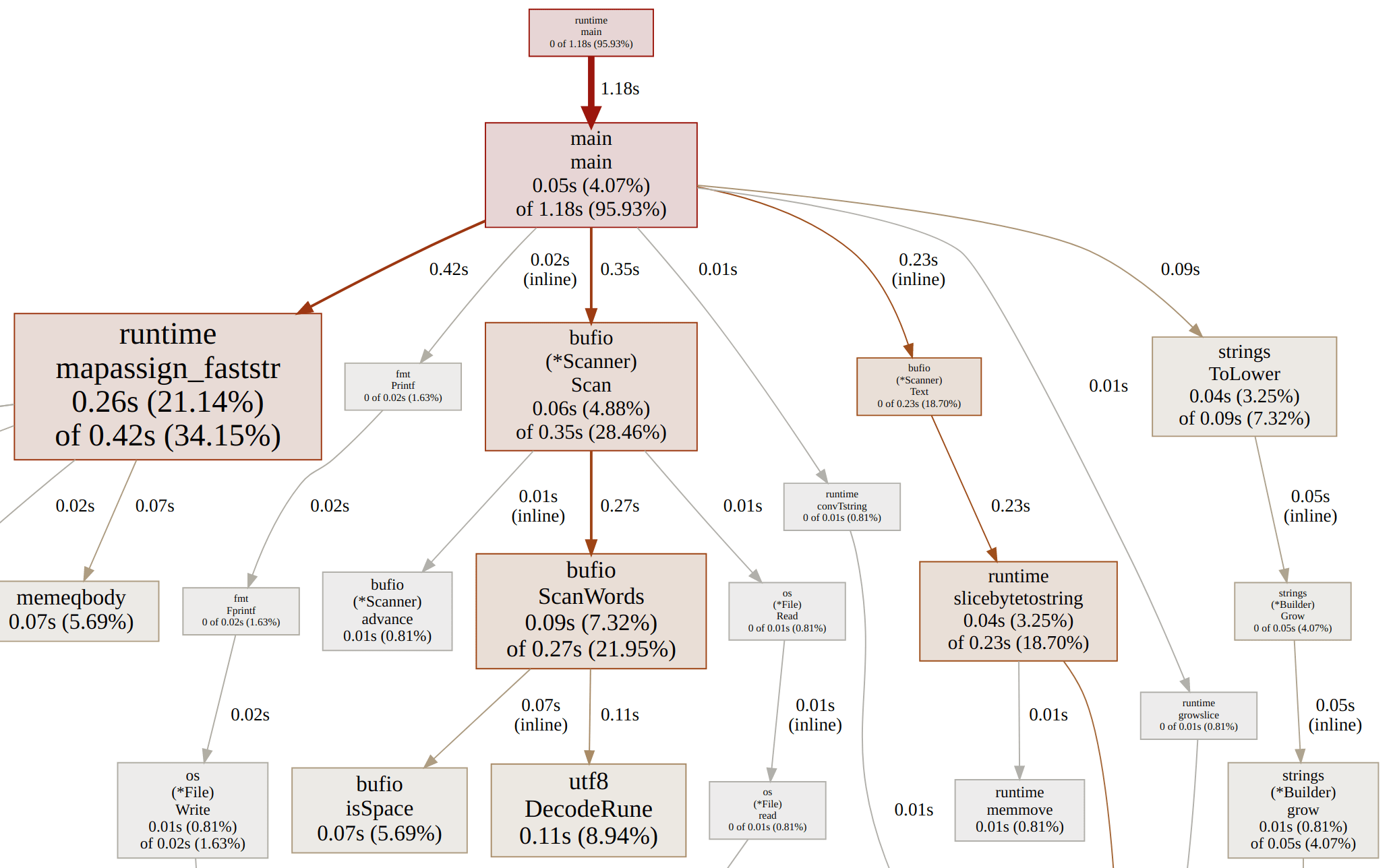
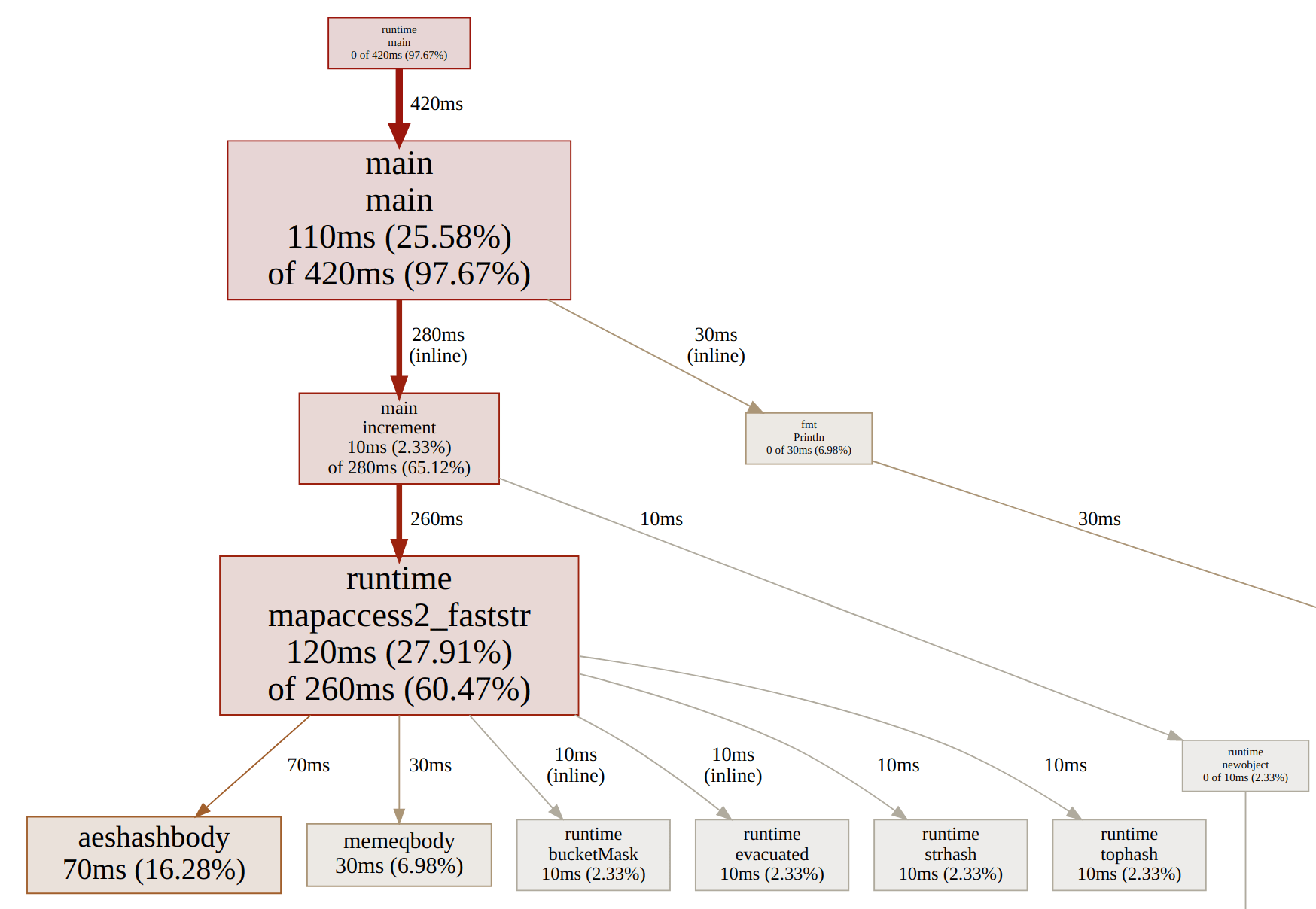
To improve scanning, we’ll do the word scanning and convert to ASCII lowercase as we go. To reduce the allocations, we’ll use a map[string]*int instead of map[string]int so we only have to allocate once per unique word, instead of for every increment.
func main() {
    var word []byte
    buf := make([]byte, 64*1024)
    counts := make(map[string]*int)
    for {
        n, err := os.Stdin.Read(buf)
        if err != nil && err != io.EOF {
            fmt.Fprintln(os.Stderr, err)
            os.Exit(1)
        }
        if n == 0 {
            break
        }
        for i := 0; i < n; i++ {
            c := buf[i]
            if c <= ' ' {
                if len(word) > 0 {
                    increment(counts, word)
                    word = word[:0]
                }
                continue
            }
            if c >= 'A' && c <= 'Z' {
                c = c + ('a' - 'A')
            }
            word = append(word, c)
        }
    }
    // ...
}
C++
C++ has come a long way since I last used it seriously: lots of goodies in C++11, and then more in C++14, 17, and 20. Here’s the simple version I came up with:
int main() {
    std::string word;
    std::unordered_map<std::string, int> counts;
    while (std::cin >> word) {
        std::transform(word.begin(), word.end(), word.begin(),
            [](unsigned char c){ return std::tolower(c); });
        ++counts[word];
    }
    // ... sort and print ...
}
When optimizing this, the first thing to do is compile with optimizations enabled (g++ -O2). There is a magic incantation you can recite at the start of your program to disable synchronizing with the C stdio functions after each I/O operation. This line makes it run almost twice as fast:
ios::sync_with_stdio(false);C
C is a beautiful beast that will never die: fast, unsafe, and simple. Unfortunately, C doesn’t have a hash table data structure in its standard library. However, there is libc, which has the hcreate and hsearch hash table functions, so we’ll make a small exception and use those libc-but-not-stdlib functions.
#define MAX_UNIQUES 60000
typedef struct { char *word; int count; } count;
int cmp_count(const void *p1, const void *p2) { /* ... */ }
int main() {
    count *words = calloc(MAX_UNIQUES, sizeof(count));
    hcreate(MAX_UNIQUES);
    char word[101];
    while (scanf("%100s", word) != EOF) {
        for (char *p = word; *p; p++) *p = tolower(*p);
        // hsearch FIND / ENTER ...
    }
    // qsort and print
}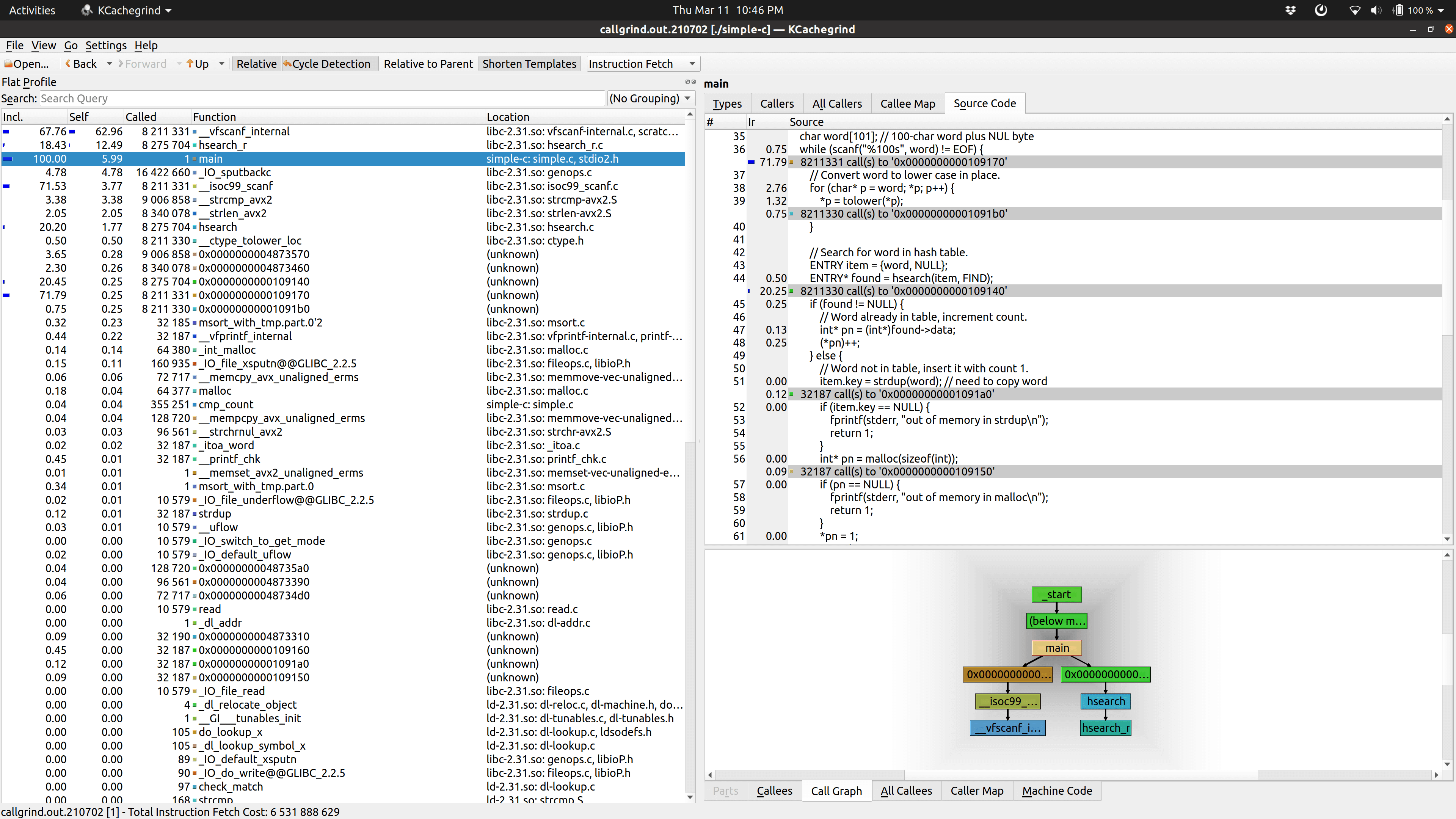
Not surprisingly, it shows that scanf is the major culprit, followed by hsearch. So here’s where we’ll go a bit crazy with optimization. I want to focus on three things: read the file in chunks, process the bytes only once, and implement our own hash table using the fast FNV-1 hash function.
#define BUF_SIZE 65536
#define HASH_LEN 65536
#define FNV_OFFSET 14695981039346656037UL
#define FNV_PRIME 1099511628211UL
typedef struct { char *word; int word_len; int count; } count;
void increment(char *word, int word_len, uint64_t hash) { /* linear probing */ }
int main() {
    table = calloc(HASH_LEN, sizeof(count));
    char buf[BUF_SIZE];
    // fread in chunks, find last space, tokenize, lowercase and hash as we go
    // increment, then qsort and print
}
AWK
AWK is actually a great tool for this job: reading lines and parsing into space-separated words are what it eats for breakfast. One thing AWK can’t do (without resorting to Gawk-specific features) is the sorting, so I’m using the AWK pipe operator to send the output through sort.
{
    for (i = 1; i <= NF; i++)
        counts[tolower($i)]++
}
END {
    for (k in counts)
        print k, counts[k] | "sort -nr -k2"
}
One small tweak I made for the optimized version was to call tolower once per line instead of for every word.
{
    $0 = tolower($0)
    for (i = 1; i <= NF; i++)
        counts[$i]++
}
We can run this using gawk -b, which puts Gawk into “bytes” mode so it uses ASCII instead of UTF-8. Another “optimization” is to run it using mawk, a faster AWK interpreter than gawk.
Forth
Forth was the first programming language I learned, so I decided to try a Forth version using Gforth.
200 constant max-line
create line max-line allot
wordlist constant counts
variable num-uniques  0 num-uniques !
: to-lower ( C -- c ) dup [char] A [ char Z 1+ ] literal within if 32 + then ;
: count-word ( addr u -- ) 2dup counts search-wordlist if >body 1 swap +! 2drop else 2dup lower-in-place ['] create execute-parsing 1 , 1 num-uniques +! then ;
: process-input ( -- ) begin parse-name dup while count-word repeat 2drop ;
For optimizing, it turns out you can run gforth-fast instead of gforth to magically speed things up.
15 :noname to hashbits hashdouble ; execute
65536 constant buf-size
create buf buf-size allot
wordlist constant counts
: count-word ( c-addr u -- ) 2dup counts find-name-in dup if >body 1 swap +! 2drop else drop nextname create 1 , 1 num-uniques +! then ;
: process-string ( -- ) begin parse-name dup while count-word repeat 2drop ;
Rust
I’m a heavy user of Andrew Gallant’s excellent ripgrep code search tool, and I knew he was pretty big into Rust (and optimization), so before publishing this article I asked him if he’d be willing to do a Rust version.
fn main() {
    if let Err(err) = try_main() {
        eprintln!("{}", err);
        std::process::exit(1);
    }
}
fn try_main() -> Result<(), Box<dyn Error>> {
    let stdin = io::stdin();
    let stdin = io::BufReader::new(stdin.lock());
    let mut counts: HashMap<String, u64> = HashMap::new();
    for result in stdin.lines() {
        let line = result?;
        for word in line.split_whitespace() {
            let canon = word.to_lowercase();
            *counts.entry(canon).or_insert(0) += 1;
        }
    }
    let mut ordered: Vec<(String, u64)> = counts.into_iter().collect();
    ordered.sort_by(|&(_, cnt1), &(_, cnt2)| cnt1.cmp(&cnt2).reverse());
    for (word, count) in ordered {
        writeln!(io::stdout(), "{} {}", word, count)?;
    }
    Ok(())
}fn try_main() -> Result<(), Box<dyn Error>> {
let stdin = io::stdin();
let mut stdin = stdin.lock();
let mut counts: HashMap<Vec<u8>, u64> = HashMap::default();
let mut buf = vec![0; 64 * (1 << 10)];
let mut offset = 0;
let mut start = None;
loop {
let nread = stdin.read(&mut buf[offset..])?;
if nread == 0 { break; }
// lowercase, split on space/newline, increment
}
let mut ordered: Vec<(Vec<u8>, u64)> = counts.into_iter().collect();
ordered.sort_by(|&(_, cnt1), &(_, cnt2)| cnt1.cmp(&cnt2).reverse());
for (word, count) in ordered {
writeln!(io::stdout(), "{} {}", std::str::from_utf8(&word)?, count)?;
}
Ok(())
}Unix shell
Let’s try a version with only basic Unix command line tools – this is essentially Doug McIlroy’s solution:
tr 'A-Z' 'a-z' | tr -s ' ' '\n' | sort | uniq -c | sort -nrIt’s quite slow, in part because it has to sort the entire file at once rather than using a hash table for counting. However, I was surprised at how much it speeds up if you set the locale of the first sort to C (ASCII-only) – that speeds it up by a factor of 5.
tr 'A-Z' 'a-z' | tr -s ' ' '\n' | LC_ALL=C sort -S 2G | uniq -c | \
    sort -nr
Other languages
Many readers contributed to the benhoyt/countwords repository to add other popular languages – thank you! (Note that I’m no longer taking new contributions.)
- Bash: Jesse Hathaway - not included in benchmarks as it takes over 2 minutes
- C#: John Taylor, Yuriy Ostapenko and Osman Turan
- C++ optimized version: Jussi Pakkanen, Adev, Nathan Myers
- Common Lisp: Brad Svercl
- Crystal: Andrea Manzini
- D: Ross Lonstein
- F#: Yuriy Ostapenko
- Go: Miguel Angel
- Haskell: Adrien Glauser
- Java: Iulian Pleșoianu
- JavaScript: Dani Biró and Flo Hinze
- Julia: Alessandro Melis
- Kotlin: Kazik Pogoda
- Lua: Flemming Madsen
- Nim: csterritt and euantorano
- OCaml: doesntgolf
- Perl: Charles Randall
- PHP: Max Semenik
- Ruby: Bill Mill
- Rust: Andrew Gallant
- Swift: Daniel Müllenborn
- Tcl: William Ross
- Zig: ifreund and matu3ba and ansingh
Performance results and learnings
Below are the performance numbers of running these programs on my laptop (64-bit Linux with an SSD using these versions). I’m running each test five times and taking the minimum time as the result (see benchmark.py). Each run is basically equivalent to the following command:
time $PROGRAM <kjvbible_x10.txt >/dev/nullThe times are in seconds, so lower is better, and the list is ordered by the execution time of the simple version, fastest first. (Note that grep and wc don’t actually solve the word counting problem, they’re just here for comparison.)
| Language | Simple | Optimized | Notes |
|---|---|---|---|
grep | 0.04 | 0.04 | grep baseline; optimized sets LC_ALL=C |
wc -w | 0.28 | 0.20 | wc baseline; optimized sets LC_ALL=C |
| Zig | 0.55 | 0.24 | by ifreund and matu3ba and ansingh |
| Nim | 0.77 | 0.49 | by csterritt and euantorano |
| C | 0.96 | 0.23 | |
| Go | 1.12 | 0.40 | |
| OCaml | 1.18 | by Nate Dobbins and Pavlo Khrystenko | |
| Crystal | 1.29 | by Andrea Manzini | |
| Rust | 1.38 | 0.43 | by Andrew Gallant |
| Java | 1.40 | 1.34 | by Iulian Plesoianu |
| PHP | 1.40 | by Max Semenik | |
| C# | 1.50 | 0.82 | by J Taylor, Y Ostapenko, O Turan |
| C++ | 1.69 | 0.27 | optimized by Jussi P, Adev, Nathan M |
| Perl | 1.81 | by Charles Randall | |
| Kotlin | 1.81 | by Kazik Pogoda | |
| F# | 1.81 | 1.60 | by Yuriy Ostapenko |
| JavaScript | 1.88 | 1.10 | by Dani Biro and Flo Hinze |
| D | 2.05 | 0.74 | by Ross Lonstein |
| Python | 2.21 | 1.33 | |
| Lua | 2.50 | 2.00 | by themadsens; runs under luajit |
| Ruby | 3.17 | 2.47 | by Bill Mill |
| AWK | 3.55 | 1.13 | optimized uses mawk |
| Pascal | 3.67 | by Osman Turan | |
| Forth | 4.22 | 1.45 | |
| Swift | 4.23 | by Daniel Muellenborn | |
| Common Lisp | 4.97 | by Brad Svercl | |
| Tcl | 6.82 | by William Ross | |
| Haskell | 12.81 | by Adrien Glauser | |
| Shell | 14.81 | 1.83 | optimized does LC_ALL=C sort -S 2G |
What can we learn from all this? Here are a few thoughts:
- I think it’s the simple, idiomatic versions that are the most telling. This is the code programmers are likely to write in real life.
- You almost certainly shouldn’t write the optimized C version, unless you’re writing a new GNU
wordfreqtool or something. It’s just too easy to get wrong. If you want a fast version in a safe language, I’d recommend Go or Rust. - If you just need a quick solution (which is likely), Python and AWK are amazing for this kind of text processing.
- C++ templates produce such horrible error messages and function names in the profiler, making them almost unreadable.
- I still think this interview question is a good one for a coding question, though obviously I wouldn’t expect a candidate to write one of the optimized solutions on the whiteboard.
- We usually think of I/O as expensive, but I/O isn’t the bottleneck here. In the case of benchmarks, the file is probably cached, but even if not, hard drive read speeds are incredibly fast these days. The tokenization and hash table operations are the bottleneck by a long shot.
This was definitely a fun exercise! I learned a good amount about optimization hot-spots, using the Valgrind profiler, and I wrote some Forth code for the first time in years.
Let me know your thoughts or feedback, or send ideas for improvements (see the discussions on Hacker News, programming Reddit, and Lobsters).
Comments
Sign in to join the conversation